
 NO
The product
Incident reporting on mobile and web.
Report incidents with photos in the app. Assign responsibility and follow up on the web.
After the trial, we follow up by email. If you would like to continue, we send you an agreement.
See the system in use
64 sec · English AI narration · English on-screen text
Chapters and transcript
SmartDeviation lets you report and follow up incidents from your phone and on the web.
Here, we start a new incident. We add a short description, explain what happened and select the incident type.
In Details, we record the immediate action: what we do straight away.
Next, we assess the consequences and how serious the incident is.
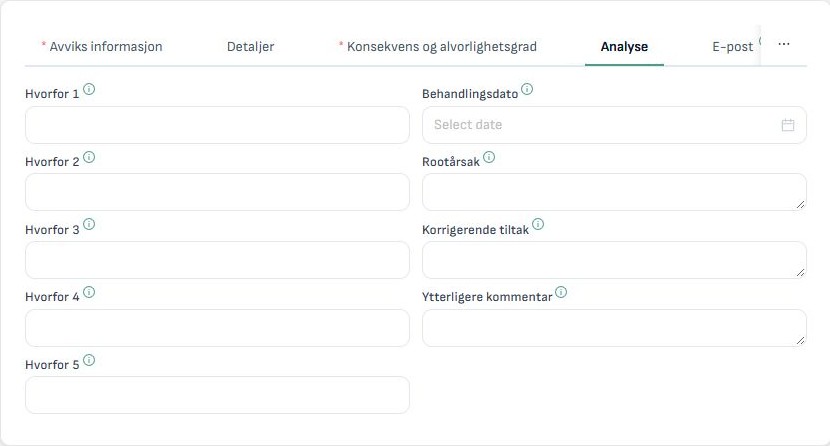
In Analysis, we look more closely at the cause. We describe what needs to change to prevent the incident happening again.
The dashboard shows status and trends over time. This helps the team prioritise follow-up.
Ready to try it yourself? Register on our website and try SmartDeviation free for three months. After the trial, we contact you by email. If you would like to continue, we send you an agreement.
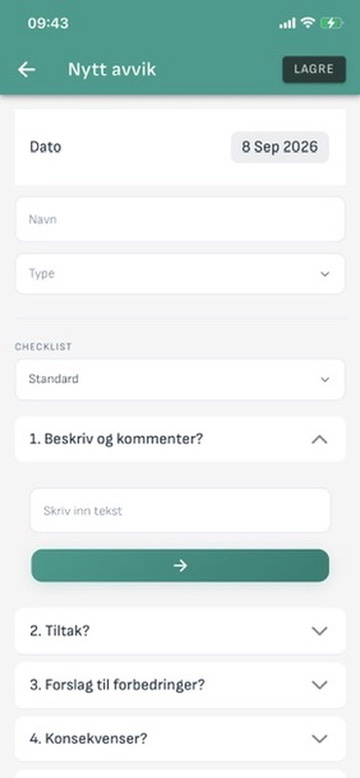
Report from your phone
Describe what happened and attach photos while you are on site. Use the same login on mobile and web.
Follow up on the web
Assign an owner and a due date. Record the cause, the actions and the work completed.
Included in the subscription
- Incident reporting
- Safe job analysis
- Safety rounds
- Hot-work checklist
A dedicated insurance module is also available. Contact us for details.
Would you like a walkthrough?
Request a walkthrough